App Store review

Independent release assessment

Policy / 2026-08-10

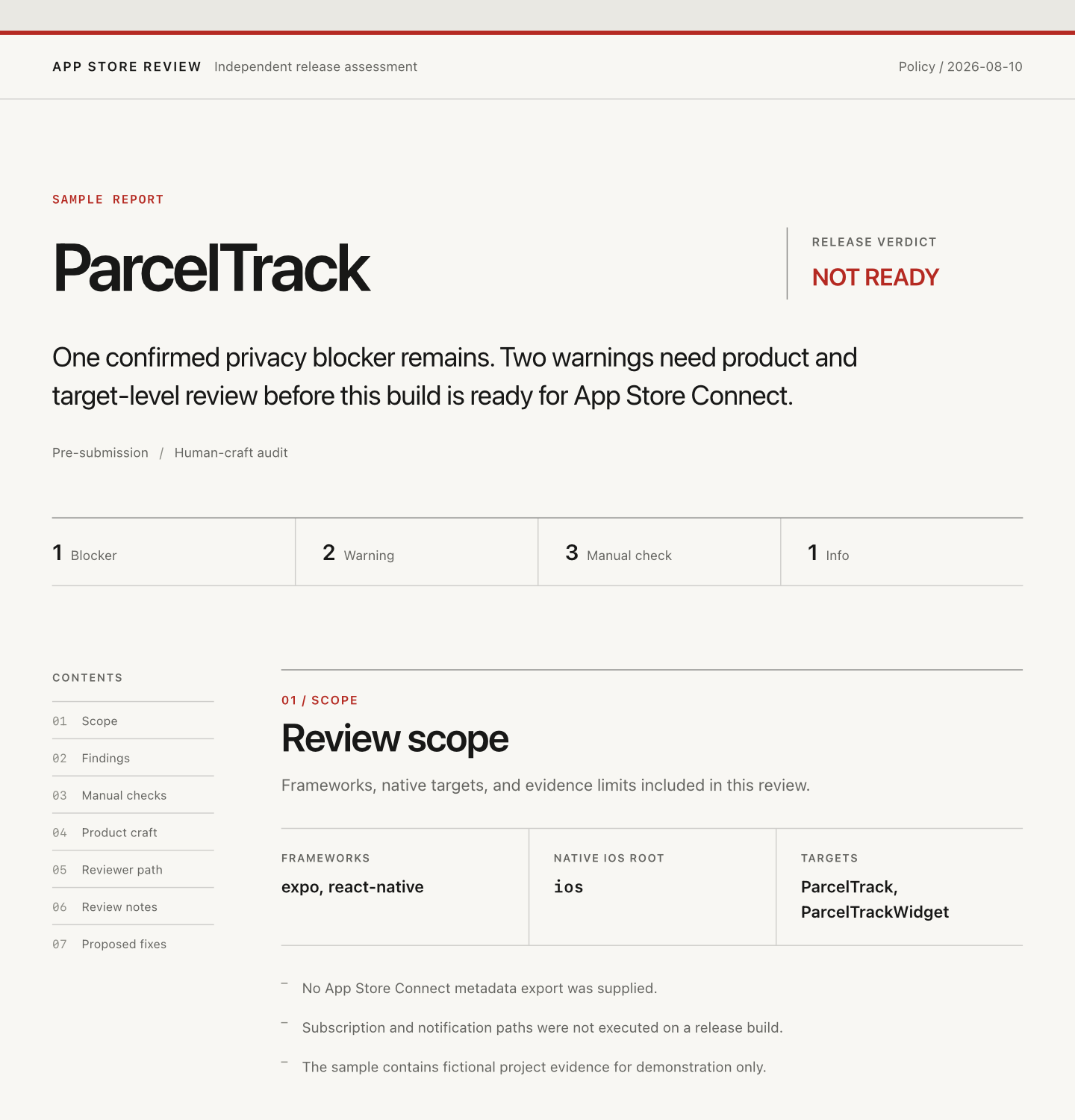
Sample report

ParcelTrack

Release verdictNOT READY

One confirmed privacy blocker remains. Two warnings need product and target-level review before this build is ready for App Store Connect.

Pre-submissionHuman-craft audit
1Blocker
2Warning
3Manual check
1Info

Scope

Review scope

Frameworks, native targets, and evidence limits included in this review.

Frameworksexpo, react-native
Native iOS rootios
TargetsParcelTrack, ParcelTrackWidget
  • No App Store Connect metadata export was supplied.
  • Subscription and notification paths were not executed on a release build.
  • The sample contains fictional project evidence for demonstration only.

Findings

Submission findings

Sorted by severity. Each item keeps the file evidence, policy basis, correction, and verification step together.

ASR-PERM-CAMERA

Camera flow has no purpose string

Blocker 5.1.1(ii) OFFICIAL

Evidence

  • src/features/scan/LabelScanner.tsx:42const permission = await Camera.requestCameraPermissionsAsync()
  • app.json:18ios.infoPlist does not include NSCameraUsageDescription

Why it matters

The release flow requests access to a protected resource without a specific explanation of why the app needs it.

Fix

Add NSCameraUsageDescription in the Expo iOS configuration and explain that the camera scans parcel labels to add tracking numbers.

Verify

Build the release archive, inspect the merged Info.plist, then trigger the label scanner on a clean device.

ASR-PRIVACY-WIDGET

Widget privacy declaration needs target-level verification

Warning 5.1.1(i) OFFICIAL

Evidence

  • ios/ParcelTrackWidget/TimelineProvider.swift:31UserDefaults(suiteName: appGroupIdentifier)
  • ios/ParcelTrackWidgetNo PrivacyInfo.xcprivacy was found in the extension source folder.

Why it matters

Privacy manifests are target-sensitive. The app target manifest does not prove that the extension ships the required declaration.

Fix

Verify the extension target resources, then add the Required Reason API declaration at the widget source of truth if the archive does not contain it.

Verify

Export the archive and inspect the widget bundle for PrivacyInfo.xcprivacy and the declared UserDefaults reason.

ASR-43-EMPTY-STATES

Primary empty states look unfinished

Warning 4.2 / 4.3(b) INFERENCE

Evidence

  • src/screens/HomeScreen.tsx:88<Text>No items yet</Text>
  • src/screens/WatchlistScreen.tsx:64<Text>No items yet</Text>

Why it matters

Two high-traffic screens use the same placeholder copy and provide no next action, which makes the product feel generic during first review.

Fix

Give each state a specific explanation and action, such as scanning the first parcel or adding a tracking number manually.

Verify

Launch with a new account and confirm each empty state explains the screen and leads to a working next step.

ASR-NOTES-WIDGET

Review notes can make the widget easier to find

Info 2.1 OBSERVED PATTERN

Evidence

  • docs/app-review-notes.md:12The app includes a home screen widget.

Why it matters

The note names the feature but does not tell a reviewer how to add it or what successful data looks like.

Fix

Add exact widget installation steps and the demo parcel that should appear.

Verify

Follow the notes from a clean simulator without using repository knowledge.

Manual checks

Checks still open

These require a release build, device, reviewer account, or App Store Connect evidence.

ASR-MANUAL-PURCHASE

Subscription terms and restore path

Static source cannot prove the storefront terms, localized price, and restored entitlement state shown by the release build.

Verify: Use a sandbox account to purchase, cancel, reinstall, and restore on iPhone and iPad.

ASR-MANUAL-PRIVACY

App Privacy answers match production data flows

Repository signals do not establish every analytics payload, retention period, or linked-data choice in App Store Connect.

Verify: Trace production analytics and crash payloads, then compare them with the submitted privacy answers.

ASR-MANUAL-IPAD

Core tracking path works on iPad

The repository does not prove layout, rotation, keyboard, or split-view behavior in the submitted build.

Verify: Complete add, edit, notification, and delete flows on a supported iPad in portrait, landscape, and split view.

Human craft

Product craft review

Grades summarize visible evidence. They are not approval probabilities and do not claim to detect AI authorship.

CREDIBLE

Product distinction

The carrier exception timeline and shared parcel workflow are product-specific, but the first-run state hides them.

UNVERIFIED

Binary and asset provenance

No sibling or prior rejected project was supplied for exact asset comparison.

CREDIBLE

Visual identity and accessibility

A consistent tracking-status system is present. Dynamic Type and VoiceOver still need device verification.

GENERIC

Microcopy and interaction states

Two primary empty states repeat placeholder copy and offer no route into the core workflow.

UNVERIFIED

Product-page specificity

No screenshots, subtitle, promotional text, or description were included in the review scope.

Reviewer path

Reviewer path

A checkmark means the path was executed or supported by supplied evidence. An open circle remains manual.

  • First launch reaches the tracking list Supported by the supplied screen recording.
  • Camera permission appears after an explanation Retest after adding the purpose string.
  • Demo parcel shows a carrier exception A stable demo tracking number is still needed.
  • Account deletion completes server-side Execute against the production-like backend.

App Review Notes

App Review Notes

Exact screen names, controls, setup, credential placeholders, and expected results for the reviewer.

Demo account: <REVIEW_EMAIL> / <REVIEW_PASSWORD>

To test label scanning, open Track, tap Add Parcel, then choose Scan Label. The camera is requested only after the explanation screen.

To test the widget, add ParcelTrack from the Home Screen widget gallery. The demo account contains one parcel in an exception state.

Fix plan

Proposed fixes

Confirmed submission work stays separate from optional product and craft changes. Repository edits still require approval.

A · Submission blockers

  • Add and verify the camera purpose string in the merged release Info.plist.
Approval required before editing

B · Target and reviewer-path checks

  • Verify the widget privacy manifest in the archive.
  • Run subscription, privacy-answer, and iPad checks.
  • Complete the widget navigation in App Review Notes.
Approval required before editing

C · Product craft

  • Replace generic empty states with screen-specific explanations and actions.
Approval required before editing